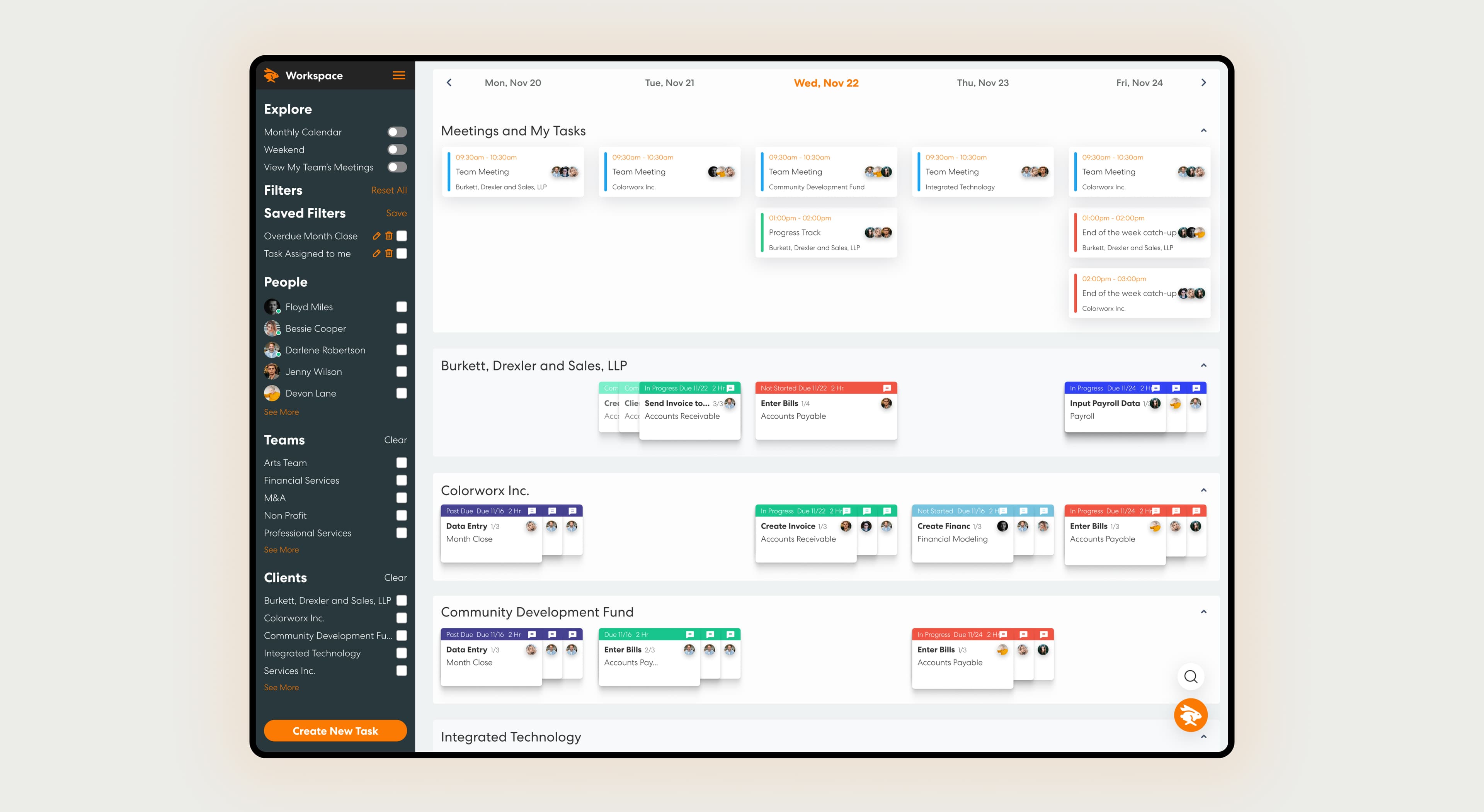
Case study 01 · Practice management · Fintech
A next-generation practice management platform for accounting and client-accounting-services (CAS) firms: workflows, capacity, client billing, and reporting connected in one place. Three and a half years as the product's sole designer, then design lead, from pre-launch through a suite of 15+ interconnected modules.
01 · Problem
Accounting and CAS firms run on recurring, deadline-bound work (month-end close, payroll processing, AP, tax prep) spread across dozens of clients at once. The tools available to them made a forced trade-off: lightweight task managers gave visibility but no depth, while heavy practice-management suites gave depth but felt like filing paperwork. Neither let a partner see firm-wide capacity and a preparer see the exact bank login a task needed in the same system.
Levvy set out to be both at once: a task-level tool detailed enough to replace the sticky notes and shared logins accountants relied on, and a firm-level system clear enough for a partner to see risk across a client portfolio at a glance. I joined pre-launch as the sole product designer and stayed three and a half years, eventually leading design as the platform grew from a single workspace into a full practice-management suite: client management, billing, dashboards, workflow building, time reporting, onboarding, departments, document storage, and more.
The recurring design tension was scope creep versus focus: every new firm we onboarded surfaced a genuinely different operational need, and the temptation was to bolt on a one-off screen for each. Holding the line on one coherent object model (client → workflow → task → subtask) is what let the product absorb years of firm-specific requests without fragmenting.
02 · Research
Early on I ran workflow-mapping sessions with founding accounting-firm partners, diagramming their real close and onboarding processes end to end: who touches a task, in what order, and what "done" actually means for a bank reconciliation versus a payroll run. That mapping became the object model the entire product is still built on: Client → Workflow → Task → Subtask, with recurrence built in as a first-class property rather than a bolt-on.
The clearest finding was that a task in accounting carries more context than a task in a generic PM tool. A single task might need a client contact, a set of credentials for the software or bank portal involved, linked files, and a running comment thread with teammates; losing any of that meant someone had to go hunting through email or a shared drive mid-task. That's what shaped the task record into the dense, tabbed structure it became, rather than a simple checkbox.
The second finding was that capacity was completely invisible to managers. Nobody could see, at a glance, who was overloaded and who had room, so work distribution was guesswork. That directly shaped the dashboard and time-reporting systems: budgeted hours, logged time, and utilization needed to live next to the work itself, not in a separate spreadsheet built after the fact.
03 · Design
Firms needed to template their recurring processes once and reuse them across every client. I designed the Workflow Builder as a drag-and-drop canvas: sections and tasks assembled visually, each workflow tagged with its own color and icon so a manager scanning a client's board can identify a payroll workflow versus a tax-prep workflow without reading a single label.
The Task Modal became the single most-used surface in the product, so I designed it to hold everything a task touches: instructions and workflow notes, task-specific notes, dependencies on other tasks, a comment thread with @mentions, built-in time tracking, and a Resources tab bundling contacts, linked software and bank/credit-card/merchant accounts, and shared files, so a preparer never has to leave the task to find what they need to complete it.
Client Management carries structured billing details (payment type, frequency, terms, rate, and a full billing history over time) directly on the client profile, with one-click invoice generation. Where billing used to live in a separate spreadsheet disconnected from the work, it now sits next to the workflows that generate it.
The Dashboard surfaces percentage-completion of workflows, groupable by team or client with date-range filtering, so a partner gets a real-time firm snapshot instead of asking around. Time Reports break the same data down by budgeted hours, logged time, and utilization per user and per client, with configurable access control so firms can decide exactly who sees what, critical in a domain where compensation and client-profitability data are sensitive.
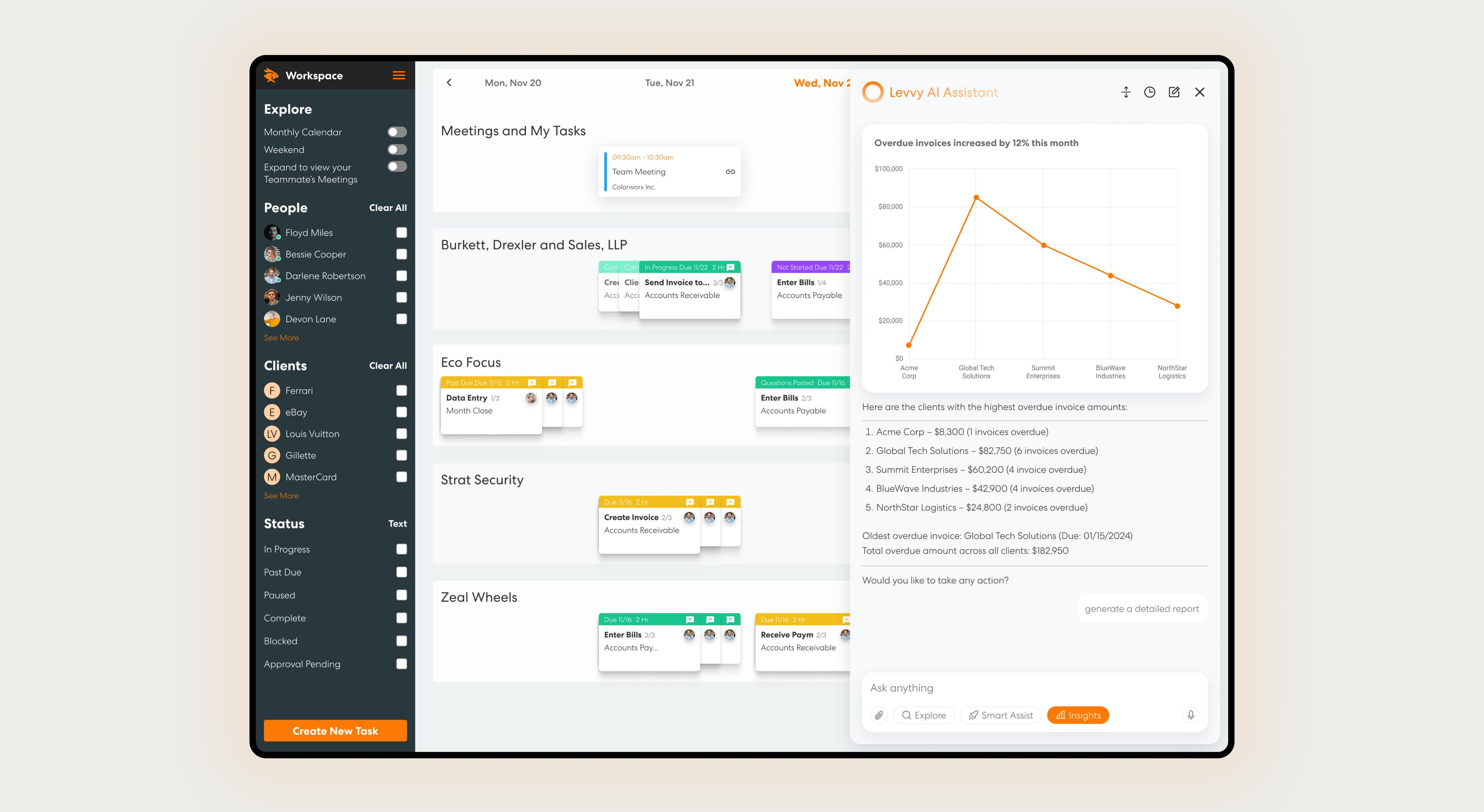
Levvy AI: Smart Assist surfaces contextual answers and next steps directly inside the workspace.
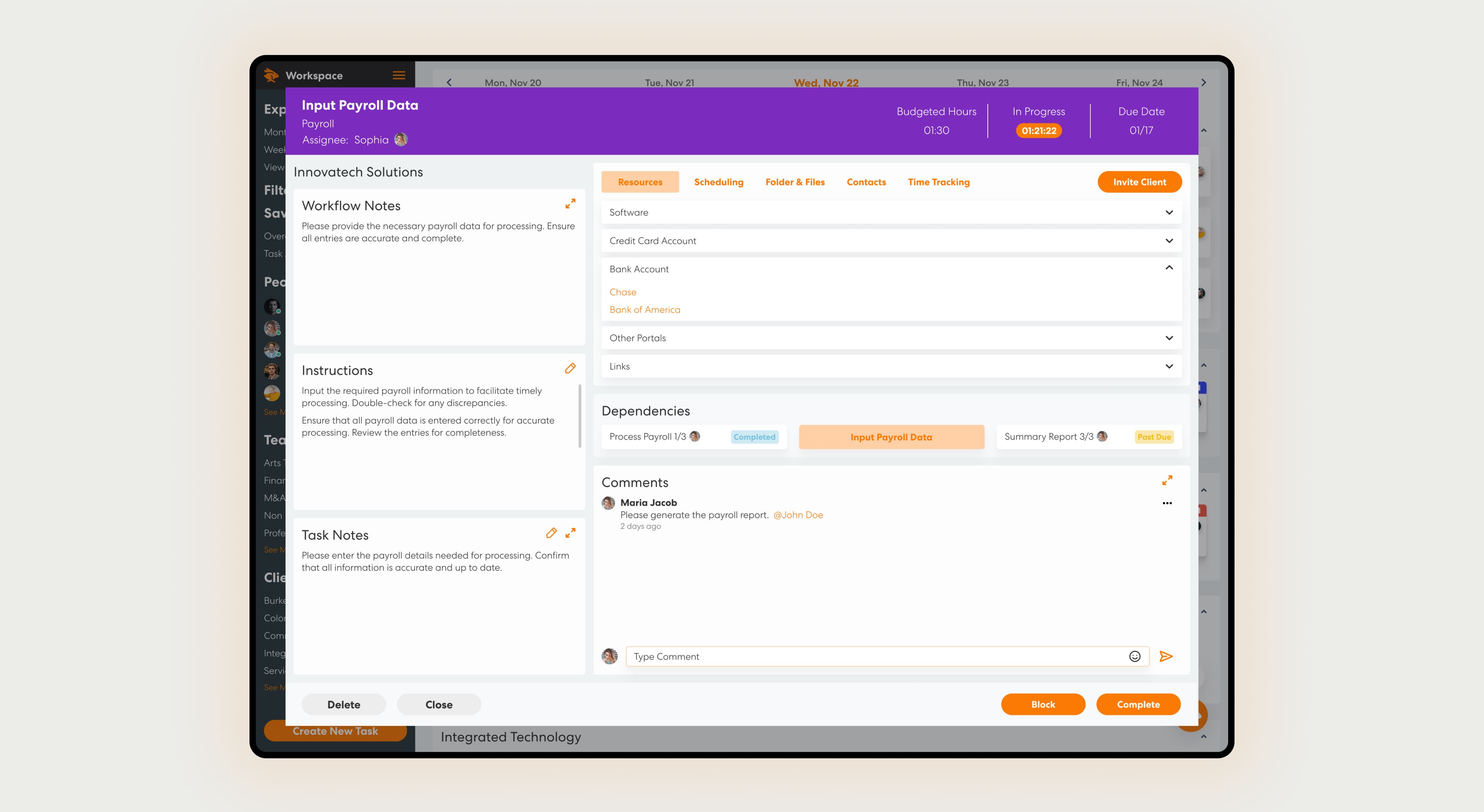
The task record's Resources tab: contacts, linked accounts, and files, without leaving the task.
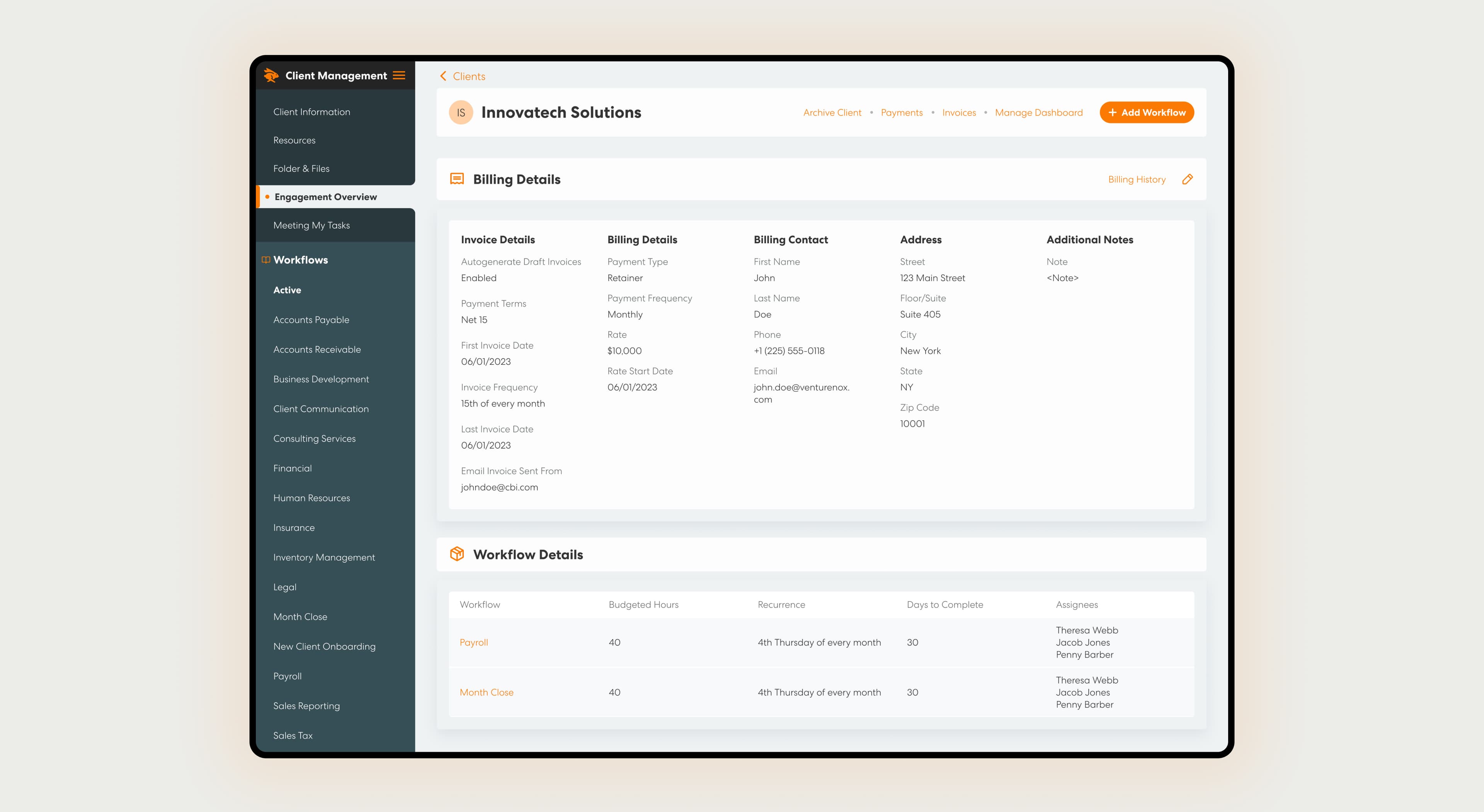
Billing details and history live on the client profile itself.
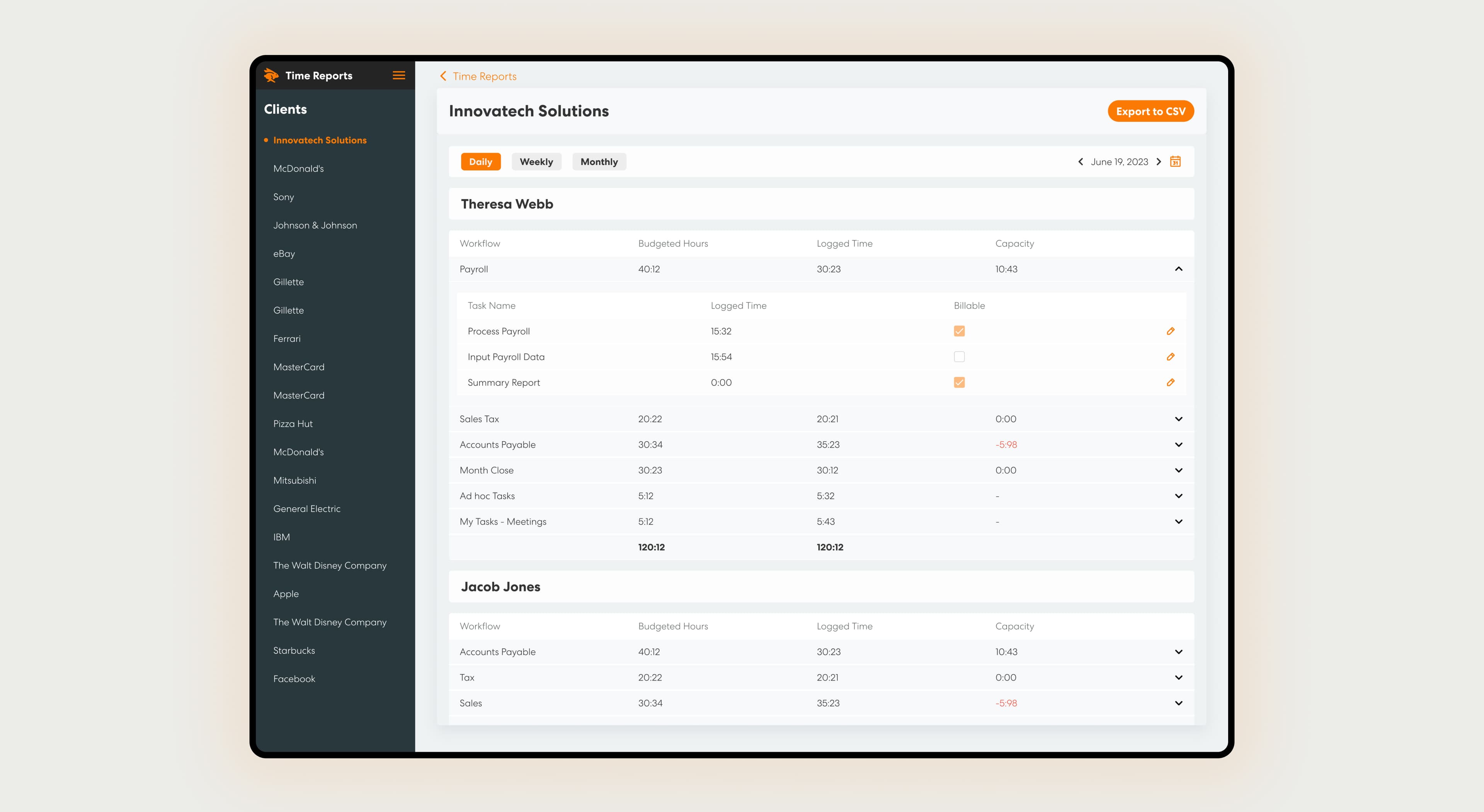
Time Reports break capacity down per user and per client.
04 · Impact
interconnected modules designed end to end: workspace, billing, dashboards, workflow builder, time reports, onboarding, departments, document storage
fewer ad-hoc task delays reported by firms after adopting Levvy's workflow and task system
of continuous ownership: sole product designer at launch, design lead by the end
Levvy shipped and grew into the practice-management system its early accounting-firm partners had been assembling from spreadsheets and sticky notes. Firms using the platform report freeing up a significant share of manager capacity and taking new workflow ideas from concept to a teammate's workspace almost instantly, a direct result of the object model holding up under years of firm-specific requests instead of forcing a redesign.
The lesson I carry forward: in a dense, professional-services domain, the design system is the thing that lets depth and usability coexist. Every new module (dashboards, time reports, departments) got easier to design accurately once client, workflow, and task were locked down as the shared vocabulary the whole product spoke.